January 2016
Beginner
512 pages
12h 35m
English
The next step is to add text and an icon to the button. We will do this by using another item type called Row, as shown:
Rectangle {
  id: button
  // …
  gradient: Gradient {
    GradientStop { position: 0; color: "#eeeeee" }
    GradientStop { position: 1; color: "#777777" }
  }
  width: buttonContent.width+8
  height: buttonContent.height+8

  Row {
    id: buttonContent
    anchors.centerIn: parent
    spacing: 4

    Image {
        id: buttonIcon
        source: "edit-undo.png"
    }
    Text {
        id: buttonText
        text: "ButtonText"
    }
  }
}
You'll get the following output:
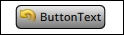
Row is one out of four positioner types (the others being Column, Grid, and Flow ...