March 2006
Intermediate to advanced
304 pages
9h 55m
English
Most characters are more or less symmetrical. As in nature, beings in the virtual environment appear to be designed along a central axis, with pairs of limbs and bones radiating from a core. You can save yourself a lot of tedious work by copying and pasting envelopes from one bone to another using the Copy and Paste buttons found in the Envelope Properties section. You can paste to one bone, or paste to all bones.
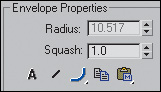
To see more than one bone envelope at once, turn on the Envelope Visibility button in the same section. Select the bone and click the button. The envelope will remain visible when you select the next bone. You ...