March 2006
Intermediate to advanced
304 pages
9h 55m
English
Now that our simulation is refined, we can add the moths and see the result. First we’ll align the moths to the delegates, so they’ll fly in the proper direction.
1. | Load the file MyMoths05.max from your folder, or load the file Moths05.max from the CD.
|
2. | Unhide the grouped objects.
Eight moths appear in the scene. Play the animation and you’ll see them beat their wings. Their flapping does no good, however; they remain stationary.
|
3. | Select the Crowd helper and go to the Modify panel.
|
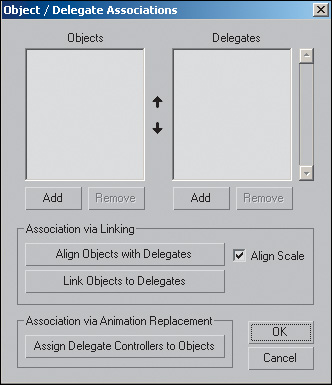
4. | On the Setup rollout, click
Object/Delegate Associations.
The Object/Delegate Associations dialog appears.
|
5. ... |