March 2006
Intermediate to advanced
304 pages
9h 55m
English
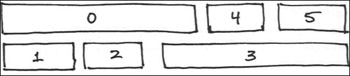
When working out the timing for footsteps, you’ll find it very helpful to make a rough sketch of how the footstep keys should look in the Dope Sheet. Also, count out the total length of time; it then becomes a simple matter to adjust the Dope Sheet to match your plan.
1. | Work out how the Dope Sheet should look for a simple two-step dance, and draw on paper the general appearance of the footstep keys.
|
2. | Reset 3ds Max, and create a biped. Then create a six-step sequence of your dance, using any footstep method.
|
3. | Open the Dope Sheet and display the footsteps. Compare the footsteps to your sketch, and see what adjustments ... |