March 2006
Intermediate to advanced
304 pages
9h 55m
English
A behavior is a set of instructions that tell a delegate how to move. Typically, two or more behaviors are used together in the same simulation.
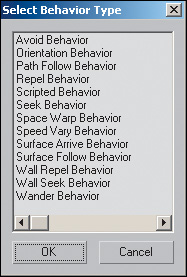
To set up a behavior, select the Crowd helper and go to the Setup rollout on the Modify panel. Click New in the Behaviors section, and choose a behavior from the list that appears.
After a behavior is selected, a rollout for it appears on the command panel. Use the options on this rollout to further set up the behavior. For example, the Seek Behavior rollout has buttons for choosing the object or objects to seek.
| Common Behaviors | |
|---|---|
| Behavior | Result |
| Seek | The delegate approaches a specific object or ... |