Skip to Content
Pythonデータサイエンスハンドブック ―Jupyter、NumPy、pandas、Matplotlib、scikit-learnを使ったデータ分析、機械学習
book

Pythonデータサイエンスハンドブック ―Jupyter、NumPy、pandas、Matplotlib、scikit-learnを使ったデータ分析、機械学習

by Jake VanderPlas, 菊池 彰
May 2018
Intermediate to advanced
556 pages
13h 21m
Japanese
O'Reilly Japan, Inc.
Content preview from Pythonデータサイエンスハンドブック ―Jupyter、NumPy、pandas、Matplotlib、scikit-learnを使ったデータ分析、機械学習
4.7
 ヒストグラム、ビニング、密度
249
plt.hist
docstring
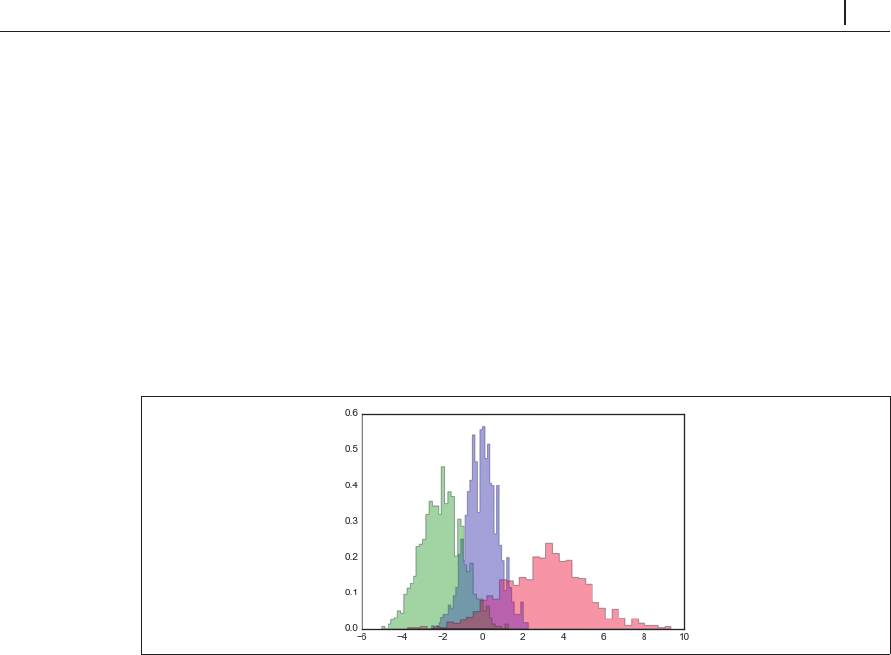
には、その他のカスタマイズオプションが数多く解説されています。異
なる分布のヒストグラムを比較する際には、
histtype='stepfilled'
オプションを使い、透過度
alpha
を設定すると見やすいグラフになります( 4-37)。
In[4]: x1 = np.random.normal(0, 0.8, 1000)
x2 = np.random.normal(-2, 1, 1000)
x3 = np.random.normal(3, 2, 1000)
kwargs = dict(histtype='stepfilled', alpha=0.3, normed=True, bins=40)
plt.hist(x1, **kwargs)
plt.hist(x2,
**kwargs)
plt.hist(x3, **kwargs)
図4-37 ヒストグラム重ね合わせ
単にヒストグラムの計算だけを行い(つまり、指定されたビン内のポイントの数を数えて)、そ
れを表示しないのであれば、
np.histogram()
関数が利用できます。
In[5]: counts, bin_edges = np.histogram(data, bins=5)
print(counts)
[ 12 190 468 301 29]
4.7.1
2
次元のヒストグラムとビニング
データ列をビンに分割して
1
次元のヒストグラムを作成するのと同様に、
2
次元
Become an O’Reilly member and get unlimited access to this title plus top books and audiobooks from O’Reilly and nearly 200 top publishers, thousands of courses curated by job role, 150+ live events each month,
and much more.
Start your free trial

You might also like

Pythonデータサイエンスハンドブック 第2版 ―Jupyter、NumPy、pandas、Matplotlib、scikit-learnを使ったデータ分析、機械学習

Pythonデータサイエンスハンドブック 第2版 ―Jupyter、NumPy、pandas、Matplotlib、scikit-learnを使ったデータ分析、機械学習

Jake VanderPlas, 菊池 彰
初めてのGraphQL ―Webサービスを作って学ぶ新世代API

初めてのGraphQL ―Webサービスを作って学ぶ新世代API

Eve Porcello, Alex Banks, 尾崎 沙耶, あんどうやすし

Publisher Resources

ISBN: 9784873118413Other