Skip to Content
Pythonデータサイエンスハンドブック ―Jupyter、NumPy、pandas、Matplotlib、scikit-learnを使ったデータ分析、機械学習
book

Pythonデータサイエンスハンドブック ―Jupyter、NumPy、pandas、Matplotlib、scikit-learnを使ったデータ分析、機械学習

by Jake VanderPlas, 菊池 彰
May 2018
Intermediate to advanced
556 pages
13h 21m
Japanese
O'Reilly Japan, Inc.
Content preview from Pythonデータサイエンスハンドブック ―Jupyter、NumPy、pandas、Matplotlib、scikit-learnを使ったデータ分析、機械学習
264
4
章 
Matplotlib
による可視化
はより良く可視化できました。
4.9.1.3
 離散的カラーバー
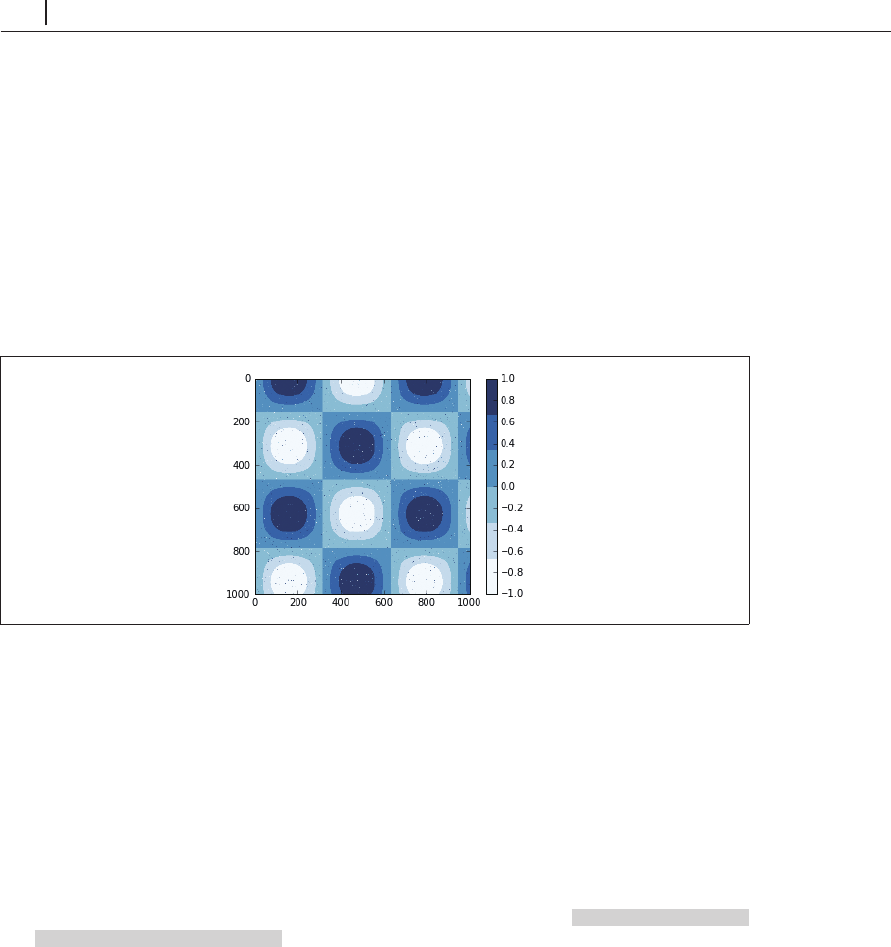
カラーマップは通常連続的ですが、離散値を表現したい場合もあります。これを行う最も簡単
な方法は、
plt.cm.get_cmap()
関数に、カラーマップの名前と目的のビンの数を渡すことです(
4-56)。
In[11]: plt.imshow(I, cmap=plt.cm.get_cmap('Blues', 6))
plt.colorbar()
plt.clim(-1, 1);
図4-56 離散化されたカラーマップ
他のカラーマップからでも、同様に離散的カラーマップは作成できます。
4.9.2
 事例:手書きの数字
離散的カラーマップが有用な場合の事例として、手書き数字データの興味深い可視化を見てみま
しょう。このデータは
scikit-learn
に含まれており、さまざまな手書き数字を示す約
2,000
個の
8
×
8
サムネイルで構成されています。
まずデータをダウンロードし、いくつかの画像を
plt.imshow()
を使用して可視化します。
In[12]: # load images of the digits 0 through 5 and visualize several of them 0
から
5
までの数字イメージデー
タをロードし、そのうちのいくつかを表示する
from sklearn.datasets import load_digits
digi
ts = load_digits(n_class=6) ...
Become an O’Reilly member and get unlimited access to this title plus top books and audiobooks from O’Reilly and nearly 200 top publishers, thousands of courses curated by job role, 150+ live events each month,
and much more.
Start your free trial

You might also like

Pythonデータサイエンスハンドブック 第2版 ―Jupyter、NumPy、pandas、Matplotlib、scikit-learnを使ったデータ分析、機械学習

Pythonデータサイエンスハンドブック 第2版 ―Jupyter、NumPy、pandas、Matplotlib、scikit-learnを使ったデータ分析、機械学習

Jake VanderPlas, 菊池 彰
初めてのGraphQL ―Webサービスを作って学ぶ新世代API

初めてのGraphQL ―Webサービスを作って学ぶ新世代API

Eve Porcello, Alex Banks, 尾崎 沙耶, あんどうやすし

Publisher Resources

ISBN: 9784873118413Other